AI video editor · Scenario maker · MCP automation
The AI video editor that writes your scenario, then cuts it
Scene Flow Shop is a browser-based video editor with a built-in AI assistant. Describe an idea and get a full scenario — concept, treatment and scene-by-scene structure — laid onto a multi-track timeline. Then refine it by asking, automate the repetitive work, and export.
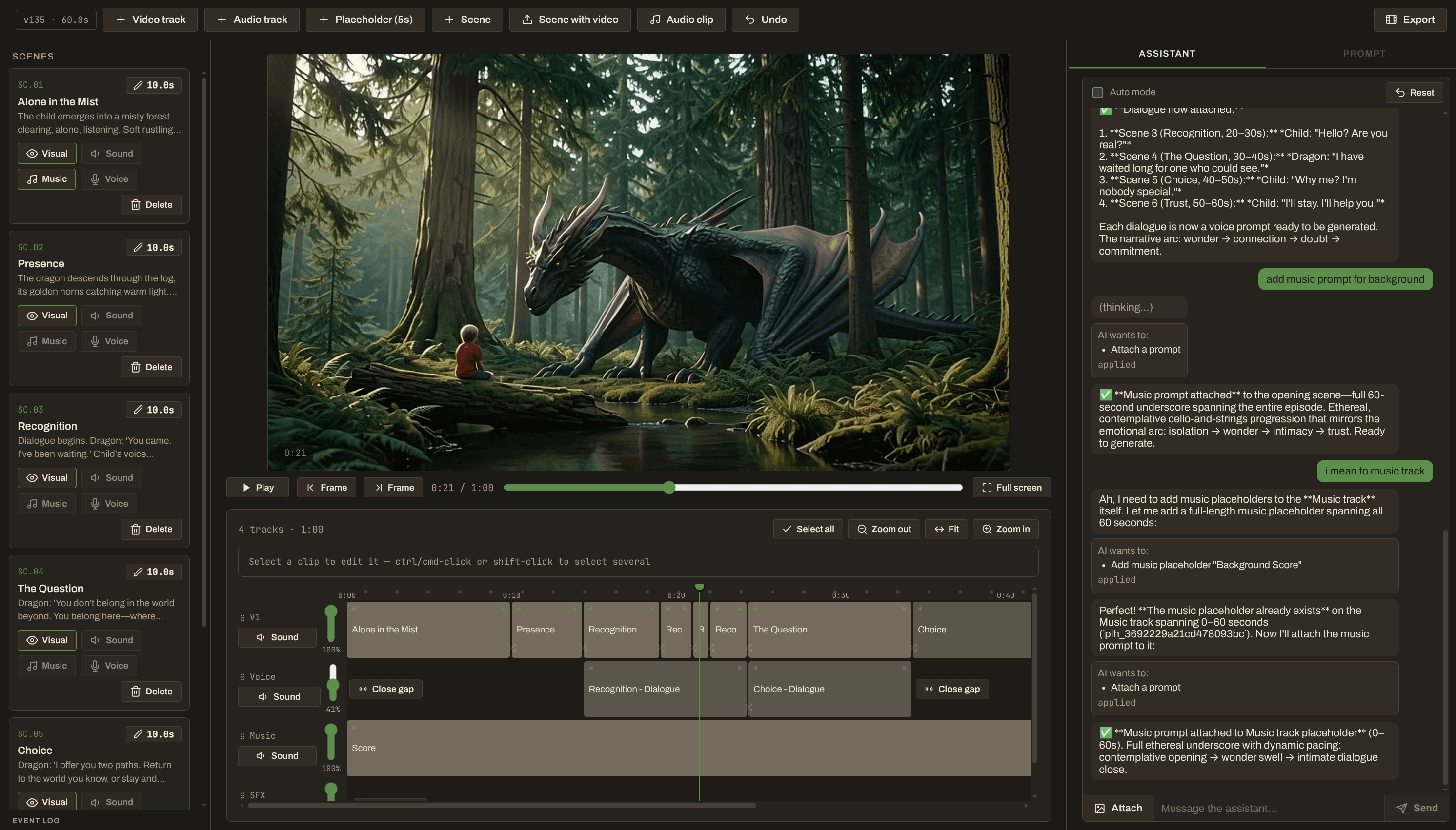
What is Scene Flow Shop?
Scene Flow Shop is an AI video editor and scenario maker that runs in your browser. It pairs a multi-track timeline editor with an AI assistant that can plan a film from a single idea and then edit it for you.
The assistant works through 53 Model Context Protocol (MCP) tools — the same operations you can perform by hand — so every change is visible, reviewable and undoable. There is no hidden AI-only path into your project.
Scene Flow Shop plans, structures and edits. It does not generate video itself: bring footage from your camera, stock libraries or any AI video generator, and drop it onto the placeholders your scenario creates.
Everything for AI-assisted video editing
AI assistant for video editing
Ask in plain language: trim this, move that, add crossfades everywhere. The assistant proposes exact changes and you approve them — or switch on auto mode.
AI scenario maker
Turn a one-line idea or a reference image into a concept, treatment and scene breakdown, then apply it straight to the timeline.
Multi-track timeline
Video and audio tracks, split, trim, duplicate, clip speed from −80% to +80%, per-clip and per-track volume, fades and crossfade transitions.
Scene-by-scene prompts
Draft five prompt variants for each shot — Balanced, More Cinematic, More Realistic, More Surreal, More Minimal — with revision history.
53 MCP tools
Projects, tracks, scenes, timeline edits, scenarios, prompts and rendering are all exposed as Model Context Protocol tools.
Editing automation
Batch dozens of edits into one approval and one undo, apply transitions across a whole track, or let auto mode build a rough cut unattended.
1080p export
Render a fast half-resolution preview or a full 1080p MP4 on a background worker while you keep editing.
Undo history
Every operation — yours or the assistant's — is versioned and attributed, and the most recent one can be undone.
How it works: from idea to exported video
Describe your idea
Type a line or attach a reference image. The assistant reads its style, mood and environment.
Generate the scenario
Get a concept, treatment and scene-by-scene structure with narrative purpose and planned durations.
Apply it to the timeline
Each scene becomes placeholders on video, music and sound-effects tracks, with prompt slots attached.
Fill in and refine
Upload footage to replace placeholders, polish the prompts, and ask the assistant for trims, transitions, speed and volume changes.
Automate the repetitive parts
Use batch edits, bulk transitions and auto mode instead of clicking through every clip.
Export
Render a preview or a 1080p MP4 and download it.
Built for filmmakers, creators and AI video workflows
Short films and narrative video
Get a structured scenario and a timeline skeleton before you shoot or generate a single clip.
YouTube and social video
Plan the story beats, pacing and durations, then assemble and tighten the cut faster.
Ads, explainers and trailers
Turn a brief into scenes with clear purposes, then iterate on timing and transitions.
AI-generated footage
Use the per-scene prompt variants with your favourite generation tool, then bring the clips back to edit.
Pricing in one paragraph
New accounts start with 20 free credits. Editing by hand costs nothing; credits pay for AI assistant usage and renders. Credit packs start at $5 for 100 credits, and you can bring your own Anthropic API key to use the assistant for free. See the pricing page for details.
Frequently asked questions
What is Scene Flow Shop?
Scene Flow Shop is a browser-based AI video editor and scenario maker. It combines a multi-track timeline with an AI assistant that can plan a film from one idea and edit it through MCP tools.
Is Scene Flow Shop a text-to-video generator?
No. It plans, structures and edits video: scenarios, scenes, prompts and the timeline. Bring footage from a camera, stock library or any AI video generator and place it on the timeline. The prompt variants it drafts are written to be pasted into external generation tools.
How does the AI assistant edit my video?
The assistant calls editing tools — trim, split, move, speed, volume, transitions and more. By default it proposes the exact tool calls and you press Apply or Cancel. In auto mode it applies them itself. Every change is versioned and can be undone.
What is the scenario maker?
It turns an idea (or a reference image) into a concept with genre, tone, duration, logline and visual direction, plus scene drafts with titles, summaries, narrative purpose and planned durations. One step then lays the scenes onto the timeline as placeholders.
What are MCP tools and why do they matter?
The Model Context Protocol (MCP) is an open standard for giving AI models tools. Scene Flow Shop exposes 53 MCP tools covering the whole editor, so the assistant edits exactly the way you do, with the same validation, versioning and undo.
Can I automate video editing?
Yes. Auto mode lets the assistant carry out a multi-step build without waiting for approval, batch edits combine many timeline changes into one approval and one undo, and bulk operations apply transitions or close gaps across a whole track.
How much does it cost?
New accounts get 20 free credits. Credit packs are 100 for $5, 300 for $12, 1000 for $30. Manual editing is free; credits are spent on AI usage and renders. There is no subscription.
Which AI model powers the assistant?
The assistant uses Claude models from Anthropic. You can pick a model in Settings and, if you prefer, use your own Anthropic API key so the assistant costs you no credits.
What can I export?
You can render a half-resolution preview for quick review or a final MP4 at up to 1920×1080.
Explore more
AI video editor: edit your timeline by asking
Edit video by asking. Scene Flow Shop's AI assistant trims, splits, re-times and adds transitions on a multi-track timeline. You approve every change.
AI scenario maker: full scenario creation, end to end
Go from one-line idea to concept, treatment, scene breakdown and a timeline. AI scenario creation with per-scene prompts, inside a video editor.
MCP video editor: 53 tools for AI-driven editing
Every editing action in Scene Flow Shop is a Model Context Protocol tool: projects, tracks, scenes, timeline, scenarios, prompts and rendering.
Video editing automation, from batch edits to auto-build
Automate video editing: let the AI build a rough cut in auto mode, batch dozens of timeline edits into one undo, and reuse projects as templates.
Pricing: pay for AI and renders, not for editing
Start with 20 free credits. Buy 100, 300 or 1000 credits from $5. Pay for AI and renders only, no subscription.